Reports of Slow and Inconsistent Wi-Fi Connections on Some iPhone 5 Devices - MacRumors
Skip to Content

Reports of Slow and Inconsistent Wi-Fi Connections on Some iPhone 5 Devices

A3a3T8iCYAAjhozNow that the iPhone 5 has reached the hands of possibly millions of new customers, there are reports that some customers are having a problem with the iPhone 5's Wi-Fi connectivity.

A thread titled Painfully Slow WiFi on new iPhone 5 on our own forums details some of the problems that have been seen by some customers. Byran85 writes:

I just got done setting up my iPhone 5 (as new, not restore). I was trying to download my music from iTunes when it seemed to be taking forever. I cancelled the downloads and then kept testing the WiFi in various other ways. Just loading the app store, my iPhone 4 will load anything faster than my iPhone 5 right now. I've rebooted the router and tried multiple devices and have narrowed the problem down to the WiFi in the iPhone 5. I've also tried using different bands, 2.4 and 5 both produce the same outcome. I launched speedtest.net app about 2 minutes ago and hit begin test. Its still "finding the closest server". I have also tried the reset network settings. Still the same issue.

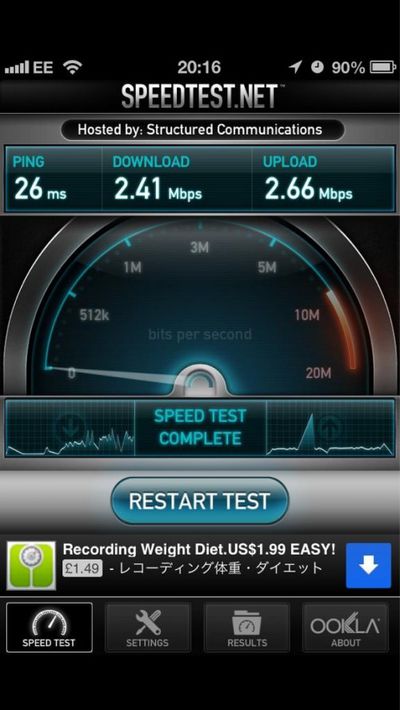
The rest of the thread shows others with the same type of problem (slow to no connectivity), while others report simply slower-than-normal connectivity. The image on the right was posted by @I_Am_Lucas showing ~2.5Mbps (~300K/s) on his Wi-Fi network. Others have even reported speeds down to 0.5Mbps (~62K/s).

Some users have been able to isolate their problem to when connecting to WPA2 encrypted Wi-Fi routers, and found that moving to (the much less secure) WEP encryption or being unprotected can resolve the issue. Since Apple Retail Stores have unprotected Wi-Fi, the issue may not show up at all in-store. Some have reported success with iPhone 5 hardware replacements from Apple, but several users have reported no success after getting a replacement unit. It should be noted that there may be multiple Wi-Fi related issues that could be affecting users. A lengthy thread in Apple's own discussion forum also reflects the same issues amongst many customers.

One Apple forum poster received confirmation from AppleCare that Apple seems to be aware of the issue, but a resolution is not yet available:

Just spoke with iPhone AppleCare and they are definitely aware of the problem and Apple engineers are working on it. I asked if it was hardware or software related and she said the WPA2 issue seems to be software based and the non-connecting issue may be hardware based, but that they are still trying to identify the cause.

According to the AppleCare representative, they are still working on the issue. The issue seems to affect a small minority of iPhone 5 owners.


Related Forum: iPhone

Popular Stories

8 CarPlay Features in iOS 27 Feature

Which iOS 27 CarPlay Features Actually Work in Your Car?

Thursday September 17, 2026 4:17 am PDT by
In iOS 27, available now, CarPlay gets its biggest update in years, but some features depend on what type of car you have rather than your iPhone model. Some of the biggest additions won't do anything in the vast majority of vehicles on the road today. Here's how the new features pan out. Works in Any CarPlay Vehicle Custom widgets: In iOS 27, CarPlay is no longer limited to Apple's handful ...
Apple Watch New Charging Puck

Here's Why a New Apple Watch Charging Puck Was Just Released

Wednesday September 16, 2026 8:53 am PDT by
The new Apple Watch Series 12 and Apple Watch Ultra 4 have hardware changes that allow for faster charging, but you will need to use the new version of the Apple Watch Magnetic Fast Charger included in the box in order to achieve this boost. If you need extra ones for your own charging stands or travel or so forth, Apple released the new version of the charger on its online store last week, with...
ios272anniversary

iOS 27.2 Could Save Your Marriage

Wednesday September 16, 2026 1:32 pm PDT by
The iOS 27.2 beta that Apple released today adds a feature that reminds you it's your anniversary when you call someone, as long as you've added the date in the Contacts app. On the date of your anniversary, when you go to call the person, you'll see a reminder that it's an important day so you don't forget to say something. The anniversary alert uses Call Context, a feature Apple added in...

Top Rated Comments

arn Avatar
183 months ago
The problem with using sites like Speedtest.com for this testing is that it is highly dependent on the customer's ISP and access points which have little to NOTHING to do with the iPhone 5.
A lot of the reports are from head-to-head comparisons of an iPhone 4S vs iPhone 5 on the same network.

note: it's not every iPhone 5. Just some.

arn
Score: 25 Votes (Like | Disagree)
joelvega125 Avatar
183 months ago
Another reason not to buy on launch day...
Score: 18 Votes (Like | Disagree)
183 months ago
Total BS I have iPhone 5 my wifi works absolutely fine, some people like to rain on everyone's parade. This is the best smartphone out there, some people just want to see it fail.

Written on my iPhone 5.


Dude this is the most ignorant thing to say. Just because it's a Apple product does not make it bulletproof. I had this problem as well but I did a factory restore without iCloud and I'm working fine. Hopefully it's a software problem that can be fixed pretty quickly. Just because your not having the issue does not mean other people are crazy, lying or out to destroy Apples image.
You my friend have a lot of growing up to do.
Score: 11 Votes (Like | Disagree)
Mr. Gates Avatar
183 months ago
Antenna Gate ....Part 2

This time it's personal ....networks ;)
Score: 10 Votes (Like | Disagree)
FirePhantom Avatar
183 months ago
The problem with using sites like Speedtest.com for this testing is that it is highly dependent on the customer's ISP which has NOTHING to do with the iPhone 5.
If you use it on your other devices and it works fine, and then it doesn't work on your iPhone 5 using the same server, then it is very clearly a problem with the iPhone 5's connection and not your internet connection in general.

OT: Hopefully this problem is not based in the hardware. Seeing as the reports indicate that it may be a WEP2-specific problem, it seems to be software-related and can hopefully be fixed by an update from Apple.
Score: 10 Votes (Like | Disagree)
183 months ago
Mine is fast. I think these reports are fake.
Score: 10 Votes (Like | Disagree)